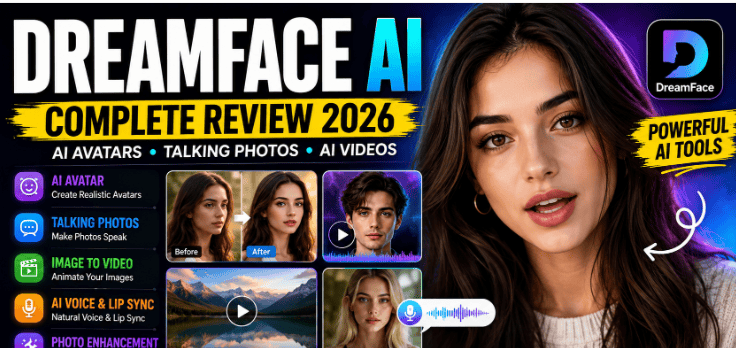
Artificial intelligence has transformed digital content creation in ways that seemed impossible just a few years ago. Creating realistic videos, animated portraits, professional headshots, or talking avatars once required expensive software and advanced editing skills. Today, AI-powered platforms allow almost anyone to produce impressive visual content using only a smartphone or computer.
Among the growing number of AI creative tools available today, DreamFace AI has attracted attention for its ability to turn ordinary photos into animated videos, generate AI avatars, create lip-synced talking portraits, and provide several other creative features in one platform.
Whether you’re a content creator, social media influencer, marketer, business owner, student, or someone who simply enjoys experimenting with AI technology, DreamFace offers a collection of tools designed to make content creation faster and easier.
In this detailed review, we’ll explore everything you need to know about DreamFace AI, including its features, supported platforms, advantages, limitations, pricing, and whether it deserves a place in your creative toolkit.
What Is DreamFace AI?
DreamFace AI is an artificial intelligence content creation platform that focuses on generating visual media from photos, text, and voice. Instead of requiring professional editing experience, the platform automates many creative tasks using machine learning.
Users can upload an image, choose an animation style, enter text or audio, and allow the AI to generate engaging visual content within minutes.
The platform combines several creative tools into one application, making it useful for both casual users and professional creators.
Instead of installing separate apps for photo animation, AI avatars, video generation, and image enhancement, many users can complete these tasks inside a single platform.
This all-in-one approach is one of the biggest reasons DreamFace continues gaining popularity.
Why DreamFace AI Has Become So Popular
The demand for AI-generated content has increased significantly over the past few years.
Short-form videos dominate platforms like TikTok, Instagram Reels, Facebook Reels, and YouTube Shorts. At the same time, businesses are constantly searching for faster ways to create engaging marketing content.
DreamFace addresses these needs by reducing the time required to produce visually appealing media.
Instead of spending hours editing videos manually, creators can generate animated content within minutes.
Another reason for its popularity is accessibility.
Many advanced editing programs require expensive hardware and months of learning.
DreamFace simplifies the process so that beginners can create professional-looking content with minimal effort.
Main Features of DreamFace AI
One of DreamFace’s biggest strengths is the variety of AI-powered tools available on a single platform.
Rather than specializing in only one feature, it combines multiple creative technologies that work together.
Some of its most notable capabilities include:
- AI photo animation
- AI talking photos
- AI avatar generation
- Text-to-video tools
- Image-to-video conversion
- AI voice generation
- Lip synchronization
- AI image enhancement
- Background removal
- Face animation
- AI portrait creation
- Photo restoration
- Video enhancement
These features make DreamFace useful for a wide variety of creative projects.
AI Talking Photos
One of the platform’s most popular features is AI talking photos.
Instead of displaying a static image, DreamFace animates facial expressions and synchronizes mouth movements with speech.
Users simply upload a portrait and provide text or audio.
The AI analyzes facial landmarks and generates realistic mouth movements that match the spoken words.
This feature has become particularly popular among:
- YouTubers
- TikTok creators
- Teachers
- Businesses
- Marketing agencies
- Storytellers
- Educational creators
Talking photos provide an engaging alternative to traditional presentations and slideshow videos.
AI Avatar Creation
Creating a professional digital avatar used to require graphic designers or expensive software.
DreamFace simplifies this process.
Users can generate AI avatars suitable for profile pictures, branding, presentations, or social media content.
These avatars can represent different styles depending on the creative direction chosen.
For creators building an online personal brand, AI avatars provide a consistent visual identity without requiring professional photography for every project.
AI Image-to-Video Generation
Static images often receive less engagement than videos.
DreamFace helps solve this problem by transforming ordinary photographs into animated videos.
Instead of uploading only still images, creators can generate dynamic content that appears more interactive.
This feature is especially valuable for:
- Travel creators
- Product marketers
- Educational channels
- Historical presentations
- Family memories
- Digital storytelling
Animated visuals often attract more attention on social media platforms where video content receives higher engagement.
AI Voice Features
Voice technology has become another major focus of AI development.
DreamFace includes voice-related features that allow users to create spoken content more efficiently.
Depending on the available tools and updates, creators may generate voiceovers, synchronize speech with animated faces, or combine AI-generated voices with visual content.
These capabilities help reduce the need for external recording equipment in certain workflows.
Photo Enhancement Tools
Old or low-quality images often limit creative possibilities.
DreamFace includes enhancement tools that improve image quality before animation.
These improvements may include:
- Sharpening details
- Increasing resolution
- Improving facial clarity
- Reducing image noise
- Restoring damaged photos
Better input images generally produce better AI-generated results.
For this reason, enhancement tools play an important role within the overall workflow.
Background Editing
Background removal has become one of the most requested editing features.
DreamFace allows users to separate subjects from their backgrounds, making it easier to create cleaner graphics, promotional materials, and social media posts.
Instead of manually selecting every edge around a subject, AI performs much of the work automatically.
This significantly reduces editing time.
User Interface
Ease of use remains one of DreamFace’s strongest advantages.
Many AI platforms include numerous settings that confuse beginners.
DreamFace presents its tools through a relatively organized interface that guides users through each creative process.
Most projects follow a simple workflow:
- Select a feature.
- Upload an image or media file.
- Enter text or choose audio.
- Adjust available settings.
- Generate the final result.
- Save or share the finished project.
This straightforward approach allows even first-time users to begin creating content without extensive tutorials.
Performance
Processing speed depends on several factors, including internet connection, server availability, project complexity, and media resolution.
Simple projects often complete within a short period, while larger or more detailed creations may require additional processing time.
Since many AI calculations occur on remote servers, users generally do not need high-end hardware to access advanced creative capabilities.
This cloud-based approach allows a wider range of users to benefit from AI-powered content creation.
let’s take a closer look at DreamFace AI’s advanced capabilities, pricing, supported platforms, and who can benefit the most from using it.
AI Video Generation
One of the standout features of DreamFace AI is its ability to generate videos from static content. Instead of requiring users to edit timelines manually, the platform automates much of the creative process.
Users can upload a portrait, select an animation style, and allow the AI to create realistic facial movement. Some projects can also include synchronized speech, expressions, and subtle head movements, making the final result feel much more dynamic than a simple slideshow.
This feature is especially useful for creators who publish content frequently but have limited time for editing.
Instead of spending hours working in traditional video editing software, creators can produce engaging videos much faster.
Text-to-Video Features
Text-to-video tools continue to grow in popularity because they allow users to transform written ideas into visual content.
DreamFace supports workflows where text can be combined with AI-generated visuals, avatars, or talking photos to create informative and engaging videos.
This can be particularly useful for:
- Educational content
- Product introductions
- Social media marketing
- Inspirational videos
- Business presentations
- Digital storytelling
Instead of recording every scene manually, creators can generate much of the visual presentation using AI-assisted tools.
AI Lip Synchronization
Lip synchronization is one of the technologies that makes AI-generated videos appear more natural.
DreamFace analyzes spoken audio and attempts to match facial movements with the words being spoken. While results depend on the quality of the uploaded image and audio, this feature can significantly improve the realism of talking portraits.
For creators making explainer videos or character-based content, accurate lip movement adds a professional touch that helps maintain viewer engagement.
AI Portrait Animation
Portrait animation transforms ordinary photographs into moving visuals.
Instead of simply blinking or smiling, AI can animate subtle facial expressions that make portraits appear more lifelike.
This technology has become popular for:
- Family memories
- Historical photos
- Memorial tributes
- Social media posts
- Marketing campaigns
- Creative storytelling
Adding movement to still images often increases viewer attention compared to static graphics.
Best Use Cases for DreamFace AI
DreamFace is versatile enough to support many different types of users.
Content Creators
YouTubers, TikTok creators, and Instagram influencers can use DreamFace to produce eye-catching videos, animated introductions, and creative short-form content without spending hours editing.
Digital Marketers
Marketing teams often need promotional videos quickly.
DreamFace allows marketers to generate engaging visuals for advertisements, product promotions, and social media campaigns while reducing production time.
Small Businesses
Businesses with limited budgets can create professional-looking promotional materials without hiring large creative teams.
AI avatars, animated product presentations, and talking images can help improve customer engagement across multiple platforms.
Teachers and Educators
Educational creators can use animated visuals to make lessons more interesting.
Instead of showing static presentations, teachers can create talking characters or animated explanations that keep students engaged.
Freelancers
Freelance designers, video editors, and social media managers may use DreamFace to expand their service offerings and complete projects more efficiently.
Social Media Enthusiasts
Users who simply enjoy experimenting with AI can create entertaining videos for personal use, family memories, or creative social posts.
Supported Platforms
Accessibility is another reason DreamFace continues growing.
The platform is available through multiple options, allowing users to create content across different devices.
Supported platforms generally include:
- Web browser
- Android
- iPhone (iOS)
This flexibility allows users to begin a project on one device and continue working from another when needed.
Pricing Overview
DreamFace generally offers free access with limited functionality, allowing new users to explore its features before committing to a subscription.
Premium plans typically unlock additional benefits such as:
- Faster AI processing
- Higher-quality exports
- More AI credits
- Additional templates
- Premium avatars
- Expanded creative tools
- Priority access to new features
The exact pricing and available plans may change over time, so users should always review the latest information within the official app or website before purchasing.
Performance and Speed
Performance is an important consideration for AI-powered applications.
DreamFace processes many tasks using cloud-based servers, allowing users to generate advanced AI content without owning expensive hardware.
Simple projects often complete fairly quickly, while more detailed animations or high-resolution exports may require additional processing time.
Internet speed also plays a role in the overall experience since many AI operations depend on online processing.
Privacy and Security
Whenever uploading personal photos to AI platforms, privacy should always be considered.
Users should review the platform’s privacy policy to understand how uploaded images and generated content are handled.
Before sharing sensitive or private photos, it is wise to confirm:
- How files are stored
- Whether uploads are encrypted
- How long media is retained
- Whether users can delete uploaded content
Understanding these policies helps users make informed decisions about the images they choose to upload.
Pros and Cons
Pros
- Easy for beginners
- Modern user interface
- Multiple AI tools in one platform
- Talking photo generation
- AI avatar creation
- Image-to-video conversion
- Photo enhancement tools
- Background removal
- Available on multiple platforms
- Useful for both personal and professional projects
Cons
- Some advanced features require a premium subscription
- AI processing depends on internet connectivity
- Generation times may vary during busy periods
- Results depend on the quality of uploaded photos
- Certain creative features may have usage limits in free plans
DreamFace AI vs Other AI Creative Apps
The AI content creation market has grown rapidly, with many platforms focusing on different creative needs.
Compared to traditional photo editing apps, DreamFace offers more automation by allowing users to animate portraits and generate talking videos.
Compared to basic video editors, it provides AI-powered creative features that reduce manual editing.
Compared to single-purpose avatar generators, DreamFace combines multiple creative tools into one platform.
This all-in-one approach makes it appealing to users who prefer not to switch between several different applications for each project.
DreamFace AI vs Traditional Photo and Video Editing
Traditional photo and video editing usually involves multiple software applications, manual adjustments, and a considerable amount of time. A creator might use one program to edit photos, another to animate images, a third to record voiceovers, and a fourth to combine everything into a final video. While this approach offers complete creative control, it can also be overwhelming for beginners and time-consuming for professionals.
DreamFace AI simplifies much of this workflow by combining several creative tools into a single platform. Instead of manually creating animations or syncing audio frame by frame, users can rely on AI to automate many of these tasks. This allows creators to focus more on storytelling and less on technical editing.
However, it’s important to understand that AI tools are designed to assist the creative process rather than replace professional editing software entirely. Advanced filmmakers, designers, and professional video editors may still prefer dedicated editing programs for projects requiring precise control over every detail.
For everyday content creation, social media videos, educational content, and marketing materials, DreamFace offers a practical balance between speed and quality.
Who Should Use DreamFace AI?
DreamFace AI is suitable for a wide range of users because it combines simplicity with powerful AI-driven features.
Content Creators
If you regularly create videos for YouTube, TikTok, Instagram Reels, or Facebook, DreamFace can help you produce engaging visuals much faster. Animated avatars, talking photos, and AI-generated videos can make your content stand out without requiring advanced editing skills.
Small Business Owners
Businesses can use DreamFace to create promotional videos, product introductions, customer announcements, and engaging social media campaigns without hiring a large production team.
Students and Teachers
Educational content often becomes more engaging when presented visually. Teachers can create animated lessons, while students can use AI-generated presentations for assignments and projects.
Digital Marketers
Marketing professionals often need to publish content quickly across multiple platforms. DreamFace speeds up the production process by automating many creative tasks while maintaining a professional appearance.
Freelancers
Freelance designers, social media managers, and content creators can use DreamFace to expand their services, complete projects more efficiently, and deliver creative content to clients in less time.
Who May Not Need DreamFace?
Although DreamFace offers impressive capabilities, it may not be the perfect solution for everyone.
Professional filmmakers working on large commercial productions may still prefer desktop editing software that offers detailed timeline editing, advanced visual effects, and precise color grading.
Users who require complete manual control over every frame of a video may also find traditional editing software more suitable.
Similarly, if your projects only involve basic photo cropping or simple video trimming, a full AI creative platform may offer more features than you actually need.
Tips for Getting Better Results
The quality of AI-generated content often depends on the materials you provide. A few simple practices can noticeably improve your final results.
- Use high-resolution images whenever possible.
- Choose portraits with good lighting and clear facial details.
- Avoid blurry or heavily compressed photos.
- Record clear audio if you’re using voice-based features.
- Keep your internet connection stable during AI processing.
- Experiment with different styles and settings to find the look that best matches your project.
Spending a little extra time preparing your source files often leads to better animations and more natural-looking outputs.
Frequently Asked Questions
Is DreamFace AI free to use?
DreamFace generally offers a free version that allows users to explore its basic features. Premium subscriptions unlock additional tools, higher-quality exports, and expanded creative options.
Can I create AI videos from a single photo?
Yes. One of DreamFace’s core features is transforming a still image into an animated video using AI-powered facial movement and animation.
Does DreamFace work on Android and iPhone?
Yes. DreamFace is available on Android, iOS, and through its web platform, allowing users to create content across different devices.
Can I use DreamFace for YouTube videos?
Yes. Many creators use DreamFace to produce introductions, talking avatars, educational content, promotional videos, and engaging social media clips.
Is DreamFace suitable for beginners?
Yes. The platform is designed with a beginner-friendly interface, making it easy to generate AI content without previous editing experience.
Does DreamFace require an internet connection?
Most AI-powered features rely on cloud processing, so an internet connection is generally required to generate content.
Final Verdict
DreamFace AI has established itself as one of the more versatile AI-powered creative platforms available today. Rather than focusing on a single feature, it combines multiple AI tools into one easy-to-use application, making it useful for content creators, educators, businesses, freelancers, and everyday users.
Its ability to animate photos, generate AI avatars, create talking portraits, enhance images, and simplify content creation helps users produce visually engaging media in much less time than traditional editing methods.
While professionals working on complex film or commercial projects may still rely on advanced desktop software, DreamFace provides an excellent solution for users who value speed, convenience, and accessibility.
As AI technology continues to evolve, platforms like DreamFace are likely to become even more capable, offering creators new ways to produce high-quality content without requiring extensive technical skills.
Conclusion
Artificial intelligence has changed the way people create digital content, making professional-looking visuals more accessible than ever before. DreamFace AI reflects this shift by offering a collection of creative tools that simplify tasks such as photo animation, avatar creation, talking portraits, and AI-assisted video generation.
Whether you’re building a personal brand, growing a YouTube channel, promoting a business, teaching online, or simply exploring the possibilities of AI, DreamFace provides an approachable platform that reduces the time and effort required to create engaging content.
Its combination of ease of use, modern AI capabilities, and support across multiple devices makes it a valuable option for creators looking to improve their workflow.
As with any creative tool, the best results come from combining technology with imagination. By using high-quality source images, experimenting with different styles, and refining your ideas, you can create content that captures attention and connects with your audience.