Creating amazing videos no longer requires an expensive camera, professional editing equipment, or years of filmmaking experience. With AI video generators, you can describe an idea in simple words and turn it into a video.
The secret is knowing how to write a good prompt.
An AI video prompt is a written instruction that tells an AI tool what to show, what should happen, how the camera should move, and what style the video should follow. The better you describe your idea, the more control you have over the result.
Whether you want to create realistic videos, funny animal clips, cinematic scenes, product advertisements, animations, or viral social media content, the right prompt can help you bring your imagination to life.
What Are AI Video Prompts?
AI video prompts are descriptions used to generate videos with artificial intelligence. Instead of recording a scene yourself, you explain what you want to see, and the AI attempts to create it.
For example, writing “a dog running” may produce a basic video. But describing a golden retriever running through a green field during sunset, with the camera following from behind and its fur moving in the wind, gives the AI more useful information.
You can use prompts with tools such as Google Flow, Google’s Veo models, Runway, and other AI video generators. Available features, video lengths, and pricing depend on the platform.
Where Can You Use AI Video Prompts?
AI-generated videos can be useful for several types of content.
YouTube Shorts and TikTok: Create funny situations, surprising transformations, miniature stories, animal videos, and visually interesting scenes.
Facebook Reels and Instagram: Generate entertaining clips, promotional videos, product demonstrations, and creative storytelling content.
Business advertisements: Describe a product, its surroundings, lighting, and camera movements to create a concept for a promotional video.
Educational content: Visualize historical scenes, scientific concepts, space exploration, or imaginary situations that are difficult to record in real life.
Animation and storytelling: Create fantasy characters, fictional worlds, animated stories, and short scenes for entertainment.
The possibilities depend on the capabilities of the video generator and how clearly you describe your idea.
How to Write a Good AI Video Prompt
A useful video prompt usually contains five important elements.
1. Subject: Describe the main person, animal, object, or character. Instead of saying “a dog,” specify its appearance, breed, color, or other important details.
2. Action: Explain exactly what the subject does. For example, a dog jumps over a small fence and runs toward its owner.
3. Environment: Describe the location, background, weather, and time of day. A crowded city street at night will produce a different atmosphere from a quiet beach at sunrise.
4. Camera movement: Explain how the scene should be filmed. You can request a close-up, wide shot, slow camera push, tracking shot, or handheld smartphone recording.
5. Visual style: Specify whether you want realistic footage, cartoon animation, stop-motion, a documentary appearance, or a dramatic cinematic look.
You can combine these elements into one simple formula:
Subject + Action + Location + Camera Movement + Lighting + Visual Style
You do not need to include every detail in every prompt. Start with the most important elements and add more instructions when necessary.
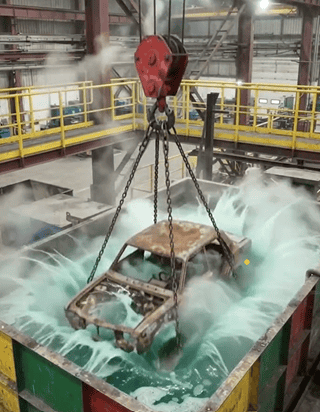
Vertical 9:16 high-angle static shot inside an industrial factory with maroon steel beams, yellow safety railings, and bright overhead lights. In the foreground is a square metal vat with green, red, and yellow panels filled with bubbling, steaming emerald-green acid. Suspended above the vat from a red crane block by four rusted chains is a heavily corroded, dark-brown rusted [OBJECT] resting on a rusty rectangular steel base.

0:00–0:04: The crane rapidly lowers the rusty [OBJECT] and platform into the bubbling green tank until almost fully submerged, creating white foam and rising steam.
0:04–0:06: While submerged, a violent burst of thick brown rust clouds billows outward into the green liquid as the acid strips the corrosion.
0:06–0:10: The crane rapidly hoists the [OBJECT] out of the vat, revealing both the [OBJECT] and base restored to a [CLEAN FINISH] suspended by clean silver chains, with green liquid streaming back into the tank.
Five Copy-and-Paste AI Video Prompts
The following prompts can be customized for different ideas and video generators.
1. Realistic Animal Video
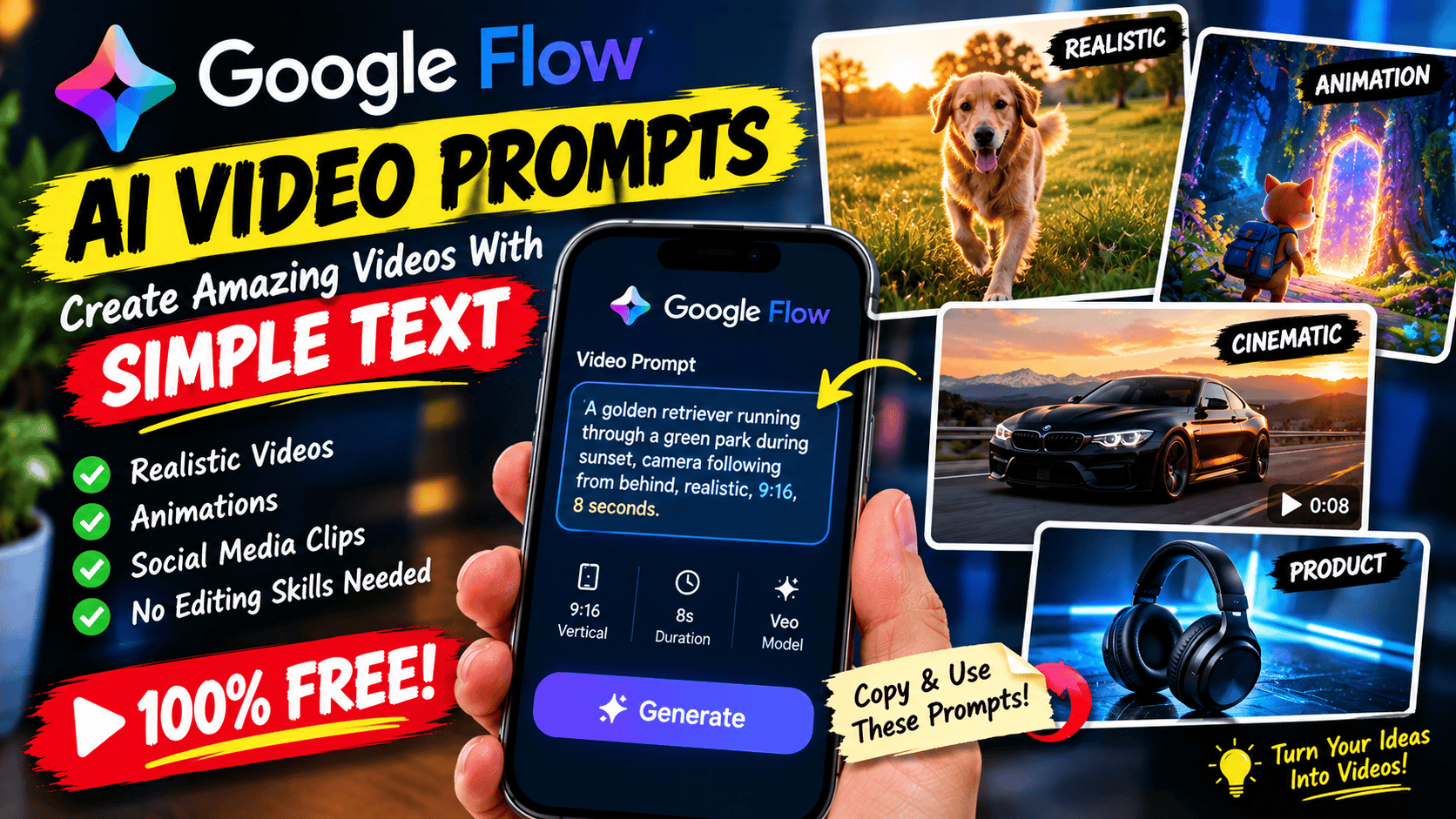
Create a vertical 9:16 smartphone video of a golden retriever running excitedly through a green park during golden hour. The dog suddenly notices a butterfly, slows down, and follows it across the grass. The camera follows the dog with natural handheld movement. Warm sunlight filters through the trees, the fur moves naturally in the breeze, and distant birds can be heard. Realistic animal movement, natural colors, authentic phone-camera appearance, approximately 8 seconds.
2. Viral Surprise Video
Create a vertical 9:16 realistic smartphone recording of a person standing in a quiet garden at night. A small glowing object rests on a table, emitting a soft blue light. The object suddenly floats upward and transforms into a spectacular glowing flower made of golden particles. The camera quickly tilts upward to follow the transformation. Natural camera shake, realistic nighttime lighting, subtle lens flare, detailed particles, and a surprised reaction from the person recording. A short, visually clear scene suitable for social media.
3. Cinematic Car Video
Create a realistic automotive video featuring a sleek black sports car driving along a winding mountain road at sunset. The camera tracks alongside the vehicle as sunlight reflects off its polished body. The car passes through a gentle curve, with distant mountains and a warm orange sky in the background. Smooth tracking movement, realistic reflections, natural shadows, detailed road textures, and professional automotive-commercial styling.
4. Cartoon Animation
Create a colorful 3D animated video featuring a small orange cat wearing a blue backpack. The cat walks into a magical forest filled with glowing mushrooms and floating fireflies. It discovers a sparkling doorway between two ancient trees and cautiously steps closer. Smooth character animation, expressive eyes, vibrant colors, soft magical lighting, and a playful family-friendly atmosphere.
5. Product Advertisement
Create a vertical 9:16 product advertisement featuring a premium black wireless headphone placed on a clean reflective surface. The camera slowly moves closer while soft blue lights illuminate the edges of the product. Small water droplets glisten on the surface, creating a premium technology-commercial appearance. Sharp product details, realistic reflections, controlled studio lighting, smooth camera movement, and a clean composition suitable for a social media advertisement.
Replace the subjects, locations, colors, and actions to create your own versions.
How to Use Google Flow for AI Video Generation
Google Flow is an AI filmmaking tool that allows users to generate video scenes from prompts and work with visual references in supported workflows.
To begin, visit the official Google Flow website and sign in with your Google account.
Choose an available video-generation option and review the supported settings. Depending on the model, you may be able to select a video format, duration, or other generation preferences.
Paste your prompt into the prompt box and generate the video.
After reviewing the result, decide what needs improvement. Perhaps the camera movement is too fast, the character looks different, or the background does not match your idea.
Edit the prompt to address the specific problem and generate another version if your available credits allow it.
Free access and generation limits can change, so check the current options available to your account before starting.
Common Mistakes to Avoid
One common mistake is writing prompts that are too vague. Words such as “beautiful,” “amazing,” and “cinematic” can communicate a general mood, but they do not explain exactly what should appear on screen.
Another mistake is asking the AI to perform too many unrelated actions in one short video. A character might need to walk, jump, transform, fly, enter a building, and change costumes within a few seconds. This can make the result confusing.
Instead, focus on one main action per clip.
You should also describe camera movement when it matters. If you want a steady shot, request a locked camera. If you want the camera to follow a running character, describe a tracking shot.
Finally, remember that AI video generation is not perfectly predictable. Faces, hands, text, physical interactions, and complex movements may contain errors. Review each result and refine the prompt when necessary.
Final Thoughts
AI video prompts make it possible to experiment with creative ideas without filming every scene yourself. You can create animal videos, animations, advertisements, fantasy scenes, and short-form social media content by describing what you want the AI to generate.
The most effective approach is to begin with a clear subject and one main action. Add the environment, camera movement, lighting, and style to guide the result.
Try the prompts in this article, change the details, and experiment with different ideas. Your first generation may not be perfect, but each attempt can help you understand how to communicate more clearly with AI video tools.
Remember: a good prompt does not need to be complicated. It needs to describe your idea clearly enough for the AI to understand what you want to see.