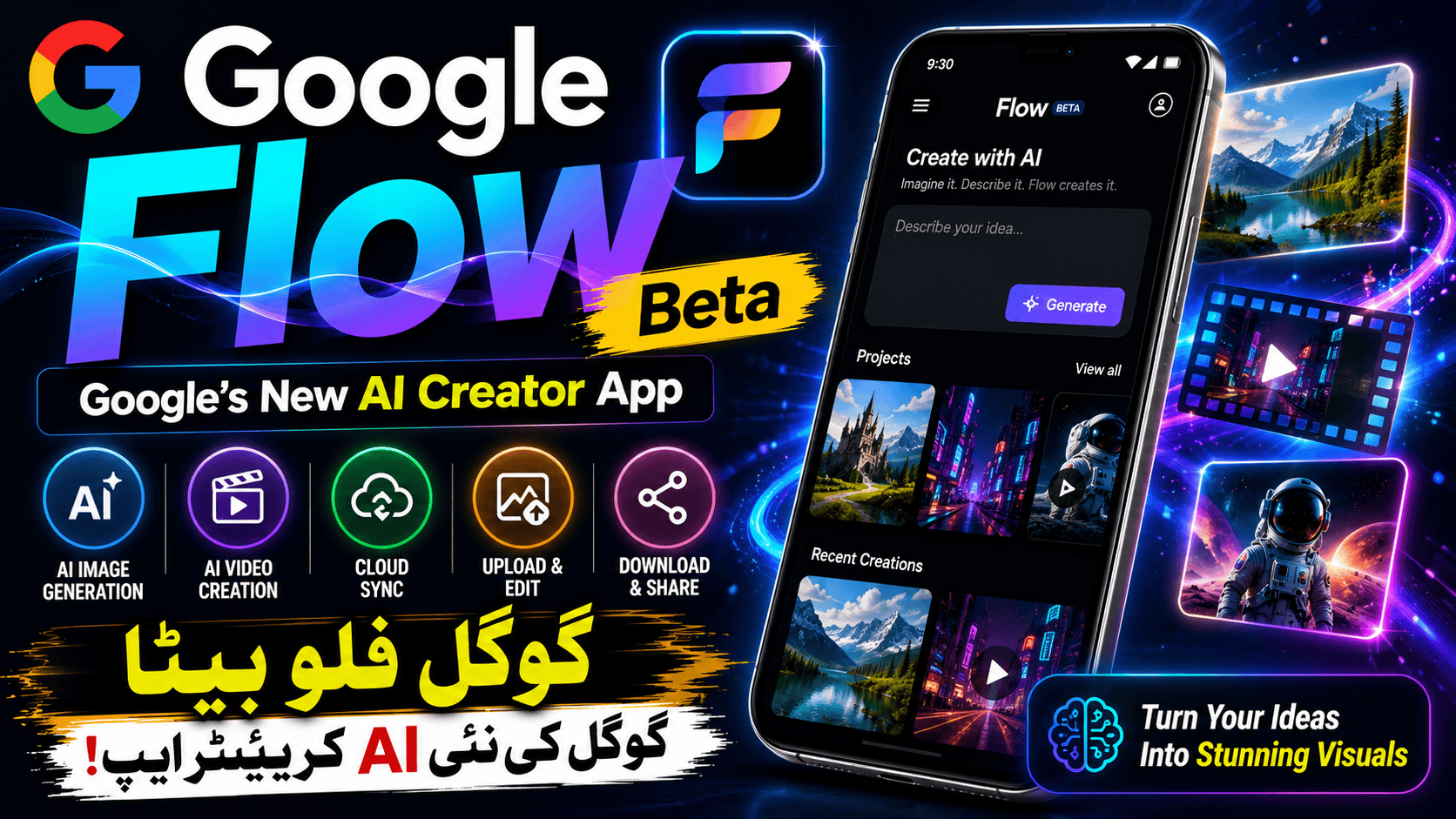
Artificial Intelligence has completely transformed digital creativity. What once required expensive software, advanced editing skills, and hours of work can now be accomplished within minutes using AI-powered tools. From generating realistic images to creating short cinematic videos, AI is changing how creators, marketers, students, and businesses produce visual content.
Google has entered this rapidly growing field with Google Flow Beta, an experimental AI-powered creative application designed to help users generate, edit, organize, and manage AI-created visual content directly from their Android devices. Unlike traditional editing software that requires manual adjustments for every element, Google Flow focuses on simplifying the creative process by allowing users to describe ideas in natural language and refine their projects with AI assistance.
As more creators look for faster ways to produce engaging content for YouTube, Instagram, TikTok, blogs, presentations, and business marketing, tools like Google Flow are becoming increasingly valuable. Instead of spending hours designing visuals from scratch, users can transform simple prompts into professional-looking creative assets while keeping their projects synchronized across devices.
In this complete guide, we’ll explore how Google Flow Beta works, its key features, who should use it, its advantages and limitations, and why it has become one of the most talked-about AI applications released by Google.
What is Google Flow Beta?
Google Flow Beta is an experimental creative application developed by Google that focuses on AI-assisted image and video generation. It allows users to create visual content by describing their ideas through text prompts while also providing options to upload existing images, organize projects, and continue editing across different devices.
Unlike many traditional design applications that require extensive editing knowledge, Google Flow is designed to reduce complexity. Users simply describe the scene, style, or concept they want, and the AI helps generate creative results that can later be refined.
One of the most useful aspects of the application is its integration with Google’s ecosystem. Projects created on a mobile device can be synchronized with desktop workflows, making it easier for creators to move between devices without losing progress. According to the Google Play listing, users can generate images and videos, upload media from their camera or gallery, receive notifications when background rendering is complete, and download or share finished creations. These capabilities are currently available as part of the beta experience.
Rather than replacing professional creative software, Google Flow aims to speed up the early stages of content creation by helping users quickly visualize ideas and experiment with different concepts.
Why Google Introduced Flow
Over the last few years, AI creativity has become one of the fastest-growing areas of technology. Millions of users now rely on AI to write articles, generate artwork, edit photos, create presentations, and even produce short videos.
Recognizing this shift, Google has invested heavily in generative AI research. The company has introduced advanced AI models capable of understanding text, images, and video, making it possible to create content in ways that were previously impossible for everyday users.
Google Flow Beta represents another step in this direction. Instead of targeting only professional designers, the application is built for anyone with an idea. Whether you’re a student preparing a presentation, a blogger creating featured images, a small business owner designing marketing visuals, or a content creator producing social media posts, the application attempts to make creative work faster and more accessible.
This approach reflects a broader trend in the AI industry, where the focus is shifting from complicated editing software toward intelligent assistants that help users create rather than requiring them to master technical design tools.
How Google Flow Beta Works
Although Google Flow uses advanced artificial intelligence behind the scenes, the overall experience is designed to remain simple.
Users begin by entering a written prompt that describes the type of image or video they want to create. The more descriptive the prompt, the better the AI understands the intended result. Instead of selecting dozens of manual editing tools, users communicate their ideas naturally using everyday language.
For example, a creator might request a futuristic city at sunset, a realistic office workspace, or a cinematic travel landscape. The AI interprets the prompt and begins generating visual content based on the description.
After generation, users can continue refining their projects. Existing images captured through the phone’s camera or selected from the gallery can also be uploaded, allowing AI-assisted editing rather than creating everything from scratch.
Rendering may take some time depending on the complexity of the project. Instead of requiring users to wait inside the application, Google Flow can notify them when processing has finished. This background rendering feature improves productivity by allowing users to continue using their devices while AI completes the creative task.
Finished projects can then be downloaded, shared, or continued on another supported device through synchronization.
Key Features of Google Flow Beta
One reason Google Flow has attracted attention is its combination of AI generation and workflow management. Rather than focusing only on image creation, the application attempts to simplify the entire creative process.
AI-powered image generation is naturally one of its primary features. Users can convert written descriptions into visual content without requiring advanced graphic design skills.
Video generation is another major capability. As AI video technology continues improving, creators are increasingly interested in producing short visual clips from text prompts rather than manually animating scenes.
Project synchronization adds another layer of convenience. Many creators begin working on a mobile device before switching to a desktop computer for additional editing. Keeping projects synchronized helps eliminate unnecessary file transfers and allows work to continue more smoothly.
Media upload support enables users to bring their own photos into the creative workflow. Instead of generating everything from scratch, existing images can become the starting point for further AI-assisted editing.
Background rendering notifications improve usability by informing users when lengthy generation tasks have been completed. This reduces idle waiting time and allows creators to multitask while AI processes their requests.
Downloading and sharing completed creations directly from the application also simplifies the publishing process, making it easier to distribute finished content across different platforms.
Who Should Use Google Flow?
One of the strengths of Google Flow Beta is that it isn’t designed exclusively for professional designers. Instead, it appeals to a wide variety of users with different creative needs.
Content creators can use the application to generate eye-catching social media graphics, YouTube thumbnails, blog illustrations, or promotional visuals.
Bloggers often require featured images that match the topic of each article. AI-assisted image generation offers a faster alternative to searching stock photo websites while allowing greater creative control.
Small business owners may use the application for product promotions, advertisements, seasonal campaigns, or marketing materials without hiring a full-time designer.
Students preparing school or university presentations can quickly create custom visuals that help explain their topics more effectively.
Digital marketers may experiment with different creative concepts before launching advertising campaigns, while educators can prepare engaging educational graphics and learning materials.
Even casual users who simply enjoy experimenting with AI art may find Google Flow entertaining because it lowers the barrier to creating professional-looking visuals.
Real-World Uses of Google Flow Beta
One of the biggest strengths of Google Flow Beta is its flexibility. Unlike traditional editing software that is often built for a specific audience, Google Flow can be used by almost anyone who needs visual content.
For bloggers, the app provides a fast way to create featured images for articles. Instead of spending time searching through stock photo websites, users can describe the image they want and let AI generate something unique. This can help blogs stand out while reducing the dependence on generic stock images.
YouTubers can also benefit from the app by generating thumbnail concepts, background artwork, and promotional graphics for their channels. Eye-catching visuals play an important role in attracting viewers, and AI-generated artwork allows creators to experiment with different styles before publishing.
Social media creators often need fresh content every day. Creating unique visuals manually can become time-consuming, especially for individuals who manage several platforms. Google Flow helps simplify this process by turning creative ideas into images or short videos within a much shorter time.
Small businesses can use the application to prepare marketing materials, promotional banners, seasonal advertisements, product showcases, and social media posts. This is particularly useful for startups or entrepreneurs who may not have the budget to hire professional designers for every campaign.
Teachers and students can also use AI-generated visuals to make educational presentations more engaging. Complex concepts often become easier to understand when supported by custom illustrations instead of plain text.
AI Image Generation Quality
One of the first questions people ask before trying an AI image generator is simple: “How good are the results?”
The answer depends largely on the quality of the prompt. AI systems work best when users clearly describe what they want to create.
Instead of writing:
“Create a city.”
A better prompt would be:
“A futuristic city at sunset with flying vehicles, modern skyscrapers, cinematic lighting, realistic reflections after rain, ultra-detailed architecture.”
The additional details give the AI far more information to work with, resulting in richer and more accurate images.
Google Flow Beta encourages this creative prompting process. Users can experiment with different descriptions, artistic styles, lighting conditions, camera angles, and environments until they achieve a result that matches their vision.
Although no AI image generator is perfect, repeated refinement usually leads to much stronger results than relying on a single prompt.
AI Video Creation
Video generation is one of the most exciting parts of modern artificial intelligence.
Instead of editing multiple clips manually, AI can now create short animated scenes based on written descriptions. This technology continues to improve rapidly, allowing creators to visualize ideas that previously required expensive software and professional editing skills.
Google Flow Beta introduces users to this growing field by allowing AI-assisted video generation alongside image creation. This makes the application useful for social media creators, marketers, educators, and anyone experimenting with visual storytelling.
While AI-generated videos are still evolving, they already provide an impressive starting point for many creative projects.
Simple User Interface
A common problem with professional editing software is complexity.
Applications designed for experienced designers often include hundreds of tools, settings, and menus that can overwhelm beginners.
Google Flow Beta takes a different approach.
The interface focuses on simplicity rather than technical editing. Users spend more time describing ideas and less time searching through complicated menus.
This makes the application approachable even for people who have never used AI creative software before.
The overall workflow feels closer to having a conversation than operating traditional design software.
Cross-Device Workflow
Modern creators rarely work on only one device.
Someone might begin creating content on their smartphone while commuting, continue editing on a laptop during work, and make final adjustments on a desktop computer at home.
Google Flow Beta recognizes this reality by supporting project synchronization.
Instead of transferring files manually between devices, users can continue their work more smoothly across compatible platforms. This reduces interruptions and helps maintain productivity throughout the creative process.
For professionals managing multiple projects every day, this convenience becomes especially valuable.
Performance and Speed
AI-generated content naturally requires significant computing power.
Rather than expecting every smartphone to perform complex AI processing locally, many modern AI services rely on cloud-based processing. This allows more advanced models to generate higher-quality results while reducing hardware limitations on mobile devices.
Google Flow Beta uses background rendering for many creative tasks.
Instead of forcing users to remain inside the application while waiting, rendering continues in the background. Once processing finishes, users receive a notification informing them that their content is ready.
This creates a smoother experience because users can reply to messages, browse the web, or continue other work while AI completes the generation process.
Privacy and Security
Whenever people use AI-powered creative applications, privacy naturally becomes an important consideration.
Google Flow Beta allows users to upload images from their camera or gallery for AI-assisted editing. Because personal media may be involved, users should understand how their data is handled before uploading sensitive content.
Reviewing the application’s privacy information, permissions, and terms of use helps users make informed decisions about what they choose to upload.
As with any cloud-based AI service, avoiding the upload of confidential personal or business information is generally a sensible practice unless you’re comfortable with the service’s data handling policies.
Keeping the application updated also helps ensure users receive the latest security improvements and feature enhancements.
Advantages of Google Flow Beta
Google Flow Beta offers several advantages that make it attractive for both beginners and experienced creators.
One of the biggest benefits is speed. Instead of spending hours creating visuals manually, users can generate creative concepts within minutes.
Another advantage is accessibility. People with little or no graphic design experience can still produce attractive images simply by describing their ideas.
The application’s clean interface reduces the learning curve, allowing new users to become productive quickly.
Project synchronization improves workflow for creators working across multiple devices.
The ability to upload existing images expands creative possibilities beyond text-only generation.
Background rendering improves productivity by allowing users to continue working while AI processes complex requests.
Finally, Google’s ongoing investment in artificial intelligence suggests that the application is likely to receive additional improvements as development continues.
Limitations to Consider
Like every beta application, Google Flow Beta also has limitations.
Some features may still be experimental, meaning occasional bugs or unexpected behavior are possible.
AI-generated images and videos may not always match the user’s expectations on the first attempt. Prompt refinement is often necessary to achieve better results.
Internet connectivity may be required for many AI generation features because cloud processing is commonly used for demanding creative tasks.
Availability may also vary depending on device compatibility, Android version, region, and beta access requirements.
Finally, while AI dramatically speeds up content creation, it does not completely replace human creativity. The best results usually come from combining AI assistance with thoughtful editing and creative direction.
Tips for Writing Better Prompts in Google Flow Beta
One of the biggest factors that affects AI-generated content is the quality of the prompt. While Google Flow Beta is designed to understand natural language, providing clear and descriptive instructions usually leads to much better results.
Instead of writing a short prompt such as:
“Create a mountain.”
Try something more detailed like:
“A snow-covered mountain during sunrise with golden light, realistic clouds, pine forests, a calm lake reflecting the landscape, cinematic composition, ultra-realistic photography.”
The second prompt gives the AI far more context about the desired scene, resulting in richer details and a more accurate image.
You can also include information about:
- Lighting
- Camera angle
- Art style
- Mood
- Color palette
- Background
- Subject details
- Image quality
For example, adding words such as cinematic, photorealistic, golden hour, wide-angle, or ultra-detailed often helps produce more visually appealing results.
Don’t hesitate to experiment. Small changes in wording can significantly change the final output.
How Bloggers Can Use Google Flow Beta
For bloggers, visuals are almost as important as the written content itself. A high-quality featured image attracts readers, improves social media sharing, and gives the article a more professional appearance.
Google Flow Beta can help bloggers create:
- Featured images
- Blog banners
- Category illustrations
- Infographics
- Social media previews
- Pinterest graphics
- Website headers
- Promotional posters
Instead of relying entirely on stock photos, bloggers can generate visuals that better match their content and brand identity.
For example, if you’re writing about AI tools, cybersecurity, smartphones, or technology trends, you can create unique illustrations that stand out from generic stock images.
How YouTubers and Content Creators Benefit
Video creators constantly need fresh graphics.
A single YouTube channel may require:
- Video thumbnails
- Community post images
- Banner artwork
- Channel branding
- Instagram posts
- Shorts covers
- Facebook graphics
Creating all of these manually can consume hours every week.
Google Flow Beta helps creators generate multiple visual concepts within minutes. Instead of starting from a blank canvas, creators can experiment with different designs before selecting the one they like most.
Although many creators still perform final editing using dedicated design software, AI dramatically speeds up the brainstorming stage.
Google Flow vs Traditional Graphic Design
Traditional design software gives professionals complete creative control.
Every object, shadow, color, layer, and effect can be adjusted manually.
However, this level of control requires experience.
Google Flow Beta approaches creativity differently.
Instead of manually building every design element, users describe the desired result using natural language.
The AI handles much of the technical work behind the scenes.
This doesn’t mean traditional software will disappear.
Instead, AI becomes another creative tool that helps users move from an idea to a first draft much faster.
Professional designers may continue refining AI-generated content using advanced editing software, while beginners can create attractive visuals without learning complicated design techniques.
Is Google Flow Beta Worth Trying?
For anyone interested in artificial intelligence, digital creativity, or content production, Google Flow Beta is certainly worth exploring.
The application demonstrates how quickly AI-powered creative tools are evolving.
Instead of focusing only on image generation, Google Flow combines several useful capabilities into one workflow.
Users can generate content, upload existing media, continue projects across devices, receive rendering notifications, and share completed creations without constantly switching between different applications.
Because the application is still in beta, users should expect continued improvements as Google gathers feedback and expands its AI capabilities.
If you’re already using AI tools for blogging, YouTube, digital marketing, education, or business promotion, Google Flow Beta provides another interesting option to explore.
Frequently Asked Questions
Is Google Flow Beta free?
Availability and pricing may change over time. Some beta features may be available at no cost during testing, while future versions could introduce additional plans or feature limitations. Always check the latest information on the Google Play listing before installing.
Can beginners use Google Flow?
Yes.
One of the application’s biggest strengths is its simple interface.
Even users without graphic design experience can begin generating images and videos by describing what they want in plain language.
Does Google Flow create both images and videos?
Yes.
Google Flow Beta supports AI-assisted image generation and video creation, allowing users to experiment with multiple forms of visual content within the same creative workflow.
Can I upload my own photos?
Yes.
Users can import images from their phone’s camera or gallery and use them as part of their creative projects.
Do I need a powerful phone?
The application is designed for Android devices, but overall performance depends on your device specifications, Android version, internet connection, and the availability of cloud-based processing.
Can I continue editing on another device?
Yes.
Google Flow supports project synchronization, allowing users to continue compatible projects across different devices more conveniently.
Is Google Flow suitable for businesses?
Absolutely.
Businesses can use it to create marketing graphics, social media posts, promotional materials, advertising concepts, and product visuals more quickly than traditional workflows.
The Future of AI Creativity
Artificial intelligence is developing faster than almost any other area of technology.
Only a few years ago, generating realistic images or videos using simple text descriptions seemed impossible.
Today, creators can transform written ideas into impressive visuals within minutes.
As AI models continue improving, future creative tools are likely to become even more powerful.
We may soon see higher-quality video generation, better editing controls, improved character consistency, more realistic animations, and deeper integration with professional creative software.
Google Flow Beta represents one step in this ongoing evolution.
Rather than replacing human creativity, it provides a powerful assistant that helps creators work faster while encouraging experimentation with new ideas.
Final Verdict
Google Flow Beta is an exciting addition to Google’s growing collection of AI-powered applications. It combines intelligent image generation, video creation, project synchronization, media uploads, and cloud-assisted workflows into a single creative platform that is accessible to both beginners and experienced creators.
Its greatest strength lies in simplifying complex creative tasks. Instead of requiring advanced design knowledge, it allows users to describe ideas naturally and transform them into visual content within minutes.
While the application is still in beta and will continue evolving, it already demonstrates the enormous potential of AI-assisted creativity. Bloggers, YouTubers, students, educators, marketers, entrepreneurs, and businesses can all benefit from its ability to accelerate content creation while reducing the technical barriers traditionally associated with graphic design.
As Google’s AI ecosystem continues to expand, Google Flow Beta is well-positioned to become an important tool for anyone interested in creating modern visual content quickly and efficiently.
Conclusion
Google Flow Beta highlights how artificial intelligence is reshaping digital creativity. By combining AI-generated images, video creation, project syncing, media uploads, and an easy-to-use interface, it provides a practical solution for users who want to bring ideas to life without mastering complex design software.
Although it is still under active development, the app already offers a glimpse into the future of creative workflows. Whether you’re designing blog graphics, creating YouTube thumbnails, planning marketing campaigns, or simply experimenting with AI art, Google Flow Beta can help you work faster while unlocking new creative possibilities.
As AI technology continues to improve, tools like Google Flow are likely to become an everyday part of how people create and share visual content.



nice
Ai video
Creator
Ai generated
Mean?