WhatsApp has become one of the most popular messaging platforms for everyday communication. People use it to talk with friends, family members, customers, colleagues, and online communities. Because WhatsApp conversations are so familiar, screenshots of chats can also be useful when creating videos, stories, tutorials, memes, social media posts, and other digital content.
This is where a fake WhatsApp chat generator comes into the picture.
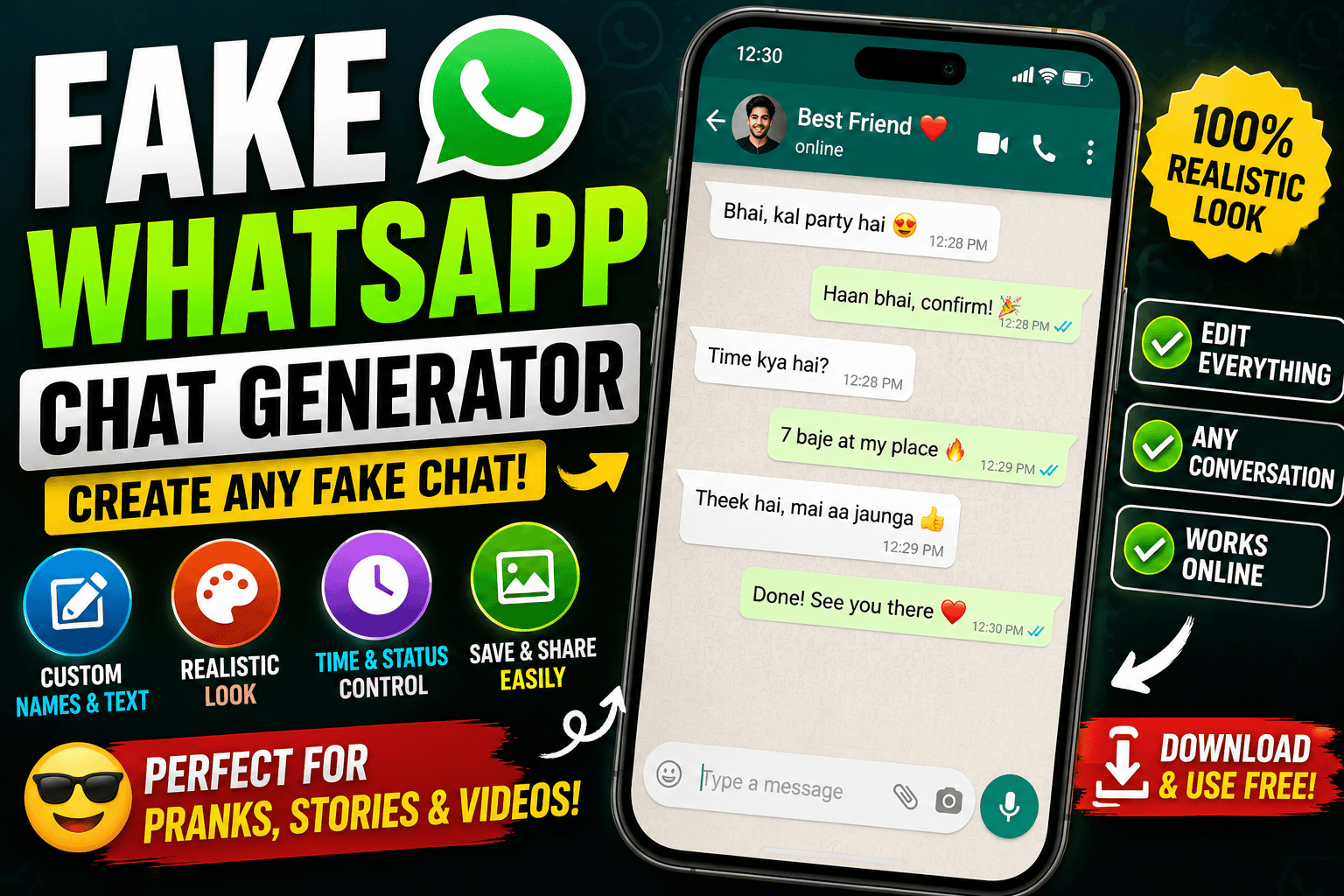
A fake WhatsApp chat generator is a tool that allows users to create a visual mockup of a WhatsApp-style conversation. Instead of communicating with a real person, users can enter fictional names, messages, timestamps, profile pictures, and other elements to create a simulated conversation.
These tools can be entertaining and useful when used responsibly. For example, a content creator might need a fictional conversation for a YouTube video, a teacher might want to demonstrate how a messaging conversation works, or someone might create a harmless chat as part of a joke between friends.
However, there is an important difference between creating a fictional chat for entertainment and using a fake conversation to deceive someone. A generated conversation should not be presented as genuine evidence or used to impersonate someone.
In this article, we’ll explain what a fake WhatsApp chat generator is, how these tools work, what you can create with them, their advantages and disadvantages, and some responsible ways to use them.
What Is a Fake WhatsApp Chat Generator?
A fake WhatsApp chat generator is an online tool or application designed to create a simulated messaging conversation that resembles the appearance of a WhatsApp chat.
The generated conversation isn’t an actual WhatsApp conversation. It is essentially a graphic or mockup created by entering information into a generator.
Depending on the tool, users may be able to customize things such as:
- Contact name
- Profile picture
- Messages
- Message bubbles
- Time and date
- Online status
- Read indicators
- Battery percentage
- Phone information
- Background appearance
- Dark or light mode
The available options vary from one generator to another.
The final result may look similar to a messaging screenshot, which is why these tools are often used for creative content.
How Does a Fake WhatsApp Chat Generator Work?
The basic concept is quite simple.
A generator usually provides a visual interface containing different fields. Instead of actually connecting to WhatsApp, the tool creates a simulated interface based on the information entered by the user.
For example, imagine you want to create a fictional conversation between two characters.
You might enter:
Contact: Ahmed
Message 1: “Are you coming to the event tonight?”
Message 2: “Yes, I’ll be there around 8.”
Message 3: “Great, see you there!”
The generator then places those messages into a WhatsApp-style layout.
Some tools allow additional customization, such as changing the contact’s profile picture or adjusting the time displayed beside each message.
Once everything looks correct, the user can usually save the result as an image.
The important thing to understand is that this doesn’t create a real WhatsApp conversation. It creates a visual representation of one.
Why Do People Use Fake WhatsApp Chats?
There are many legitimate creative reasons someone might need a simulated conversation.
One of the most common is entertainment.
A creator might make a funny fictional conversation and turn it into a short video. Another person might use a fake conversation as part of a meme or social media post.
Writers can also use chat-style conversations when developing fictional stories.
For example, instead of writing a traditional dialogue between two characters, a creator could show their conversation through a messaging interface.
This can make the story feel more modern and relatable.
Using a Fake Chat to Prank a Friend
Harmless pranks are another popular use.
For example, you could create a fictional conversation involving an imaginary character and send it to your friend as part of a joke.
However, the prank should remain harmless.
Don’t use fake conversations to cause serious fear, damage someone’s reputation, create relationship problems, or falsely accuse another person.
A good prank should be funny when the truth is revealed rather than something that causes genuine emotional or financial harm.
Fake Chat Generators for YouTube Videos
Content creators can use simulated chats to make videos more interesting.
Suppose you’re creating a YouTube Short about a fictional story.
Instead of simply narrating:
“John received a strange message from an unknown person.”
You could show the conversation visually.
The audience sees the messages appearing one after another, while sound effects and narration are added during editing.
This can create a more immersive storytelling experience.
The same concept works for TikTok, Instagram Reels, Facebook videos, and other short-form content.
Creating Chat Screens for Stories
A fake WhatsApp conversation can also be useful for storytelling.
Imagine a fictional story about two friends planning a surprise birthday party.
The conversation could appear on screen:
Sara: “Don’t tell him about the party.”
Ali: “Don’t worry. Everything is ready.”
Sara: “Perfect. I’ll bring the cake.”
This type of presentation can make a short story feel more dynamic.
Writers can also use chat mockups to visualize fictional conversations before turning them into a video or screenplay.
Educational Uses
There are also educational applications.
Teachers and trainers can create simulated conversations to demonstrate communication scenarios.
For example, a digital safety lesson could use a fictional conversation to explain how suspicious messages might appear.
Similarly, a language teacher could create a fictional messaging conversation to help students practice everyday vocabulary.
In these situations, labeling the conversation as fictional helps avoid confusion.
Social Media Content
Social media creators are constantly searching for formats that make viewers stop scrolling.
Chat-style content works well because messaging is something most people immediately recognize.
A creator can combine a simulated conversation with:
- Background music
- Voiceover
- Animated message bubbles
- Sound effects
- Captions
- Zoom effects
- Screen recordings
The result can be turned into a short story or comedy video.
Important Difference Between a Mockup and a Real Conversation
This is probably the most important thing to understand about these tools.
A fake WhatsApp chat generator does not create an authentic WhatsApp conversation.
It creates a visual simulation.
That means a generated screenshot should not be treated as proof that a person actually sent a particular message.
This distinction matters because screenshots can easily be misunderstood when taken out of context.
If you’re publishing a fictional conversation online, adding labels such as “fictional,” “mockup,” “simulation,” or “AI-generated” can make the context clear.
Advantages of Fake WhatsApp Chat Generators
There are several reasons people find these tools useful.
Easy to Use
Most generators are designed around simple forms and visual controls. You don’t necessarily need professional graphic design experience.
Fast Content Creation
Creating a fictional conversation manually in image-editing software can take considerably more time. A dedicated generator can simplify the process.
Useful for Storytelling
Chat conversations can be an engaging way to present fictional stories, jokes, and social media content.
Customizable
Depending on the tool, users may be able to change names, messages, profile images, timestamps, themes, and other visual elements.
Helpful for Video Creators
Creators can use generated chat images as visual material for short videos, tutorials, and storytelling content.
Good for Prototyping
A designer developing a messaging-related project can create a quick visual mockup to demonstrate an idea.
Disadvantages and Limitations
Fake chat generators also have disadvantages.
They Can Be Misleading
A realistic-looking fake conversation can easily be mistaken for a real one.
Limited Customization
Some free generators provide only basic options, while more advanced customization may be unavailable.
Quality Differences
Not every generator produces high-quality results. Some may have poor typography, inaccurate interface elements, or low-resolution exports.
Privacy Concerns
Users should be careful about uploading real people’s photographs, private conversations, or personal information to unknown websites.
Not a Replacement for Real Messaging
A generated chat isn’t connected to WhatsApp and doesn’t represent an actual conversation.
Privacy and Safety Tips
Before using any online chat generator, think carefully about the information you’re entering.
Avoid uploading sensitive personal information.
Don’t use real private conversations as templates without permission.
If you use someone’s photograph, consider whether you have the right to use it.
You should also be cautious when downloading files from unfamiliar websites. Some websites may contain aggressive advertising, unwanted downloads, or misleading buttons.
Using a reputable tool and keeping sensitive information out of the project is a safer approach.
Can Fake WhatsApp Chats Be Used for Pranks?
Yes, they can be used for harmless entertainment, but context matters.
A funny fictional conversation between friends is very different from creating fake evidence against someone.
For a safe prank, avoid situations involving:
- Financial fraud
- False accusations
- Threats
- Harassment
- Impersonation
- Relationship manipulation
- Defamation
- Extortion
- Fake emergency situations
The goal should be entertainment rather than harm.
Fake WhatsApp Chat Generator vs Real WhatsApp
The difference can be summarized easily.
A fake chat generator is therefore a design and content tool, not a messaging service.
How Creators Can Make Better Fake Chat Content
If you’re using a simulated conversation for a video, don’t stop at generating a screenshot.
Think about the entire presentation.
Start with a strong opening.
For example:
“I received this message at 2 AM…”
Then show the first message.
Add a subtle notification sound.
Reveal the conversation gradually instead of displaying everything at once.
You can use CapCut or another video editor to animate the messages and add voiceover, music, zoom effects, and sound effects.
This transforms a simple chat screenshot into an engaging short-form video.
Are Fake WhatsApp Chat Generators Free?
Many online generators offer basic functionality for free, although pricing varies significantly between tools.
Some may provide free exports with limitations, while others may offer premium features.
Before using a paid service, check what you’re actually receiving.
Look for information about:
- Export quality
- Watermarks
- Available customization
- Number of projects
- Privacy policies
- Subscription terms
Don’t assume that every website offering a “free” generator provides unlimited access.
Is a Fake WhatsApp Chat Generator Legal?
The answer depends heavily on how the generated content is used.
Creating a fictional conversation for a story, joke, educational project, or clearly labeled mockup is generally very different from using fabricated messages to deceive, defame, impersonate, or commit fraud.
The safest approach is to keep fictional content clearly fictional.
If your content could reasonably be mistaken for real evidence, add an appropriate disclosure.
When using someone’s name or image, also consider privacy, impersonation, copyright, and applicable local laws.
Who Can Benefit From These Tools?
Fake chat generators can be useful for:
- YouTube creators
- TikTok creators
- Bloggers
- Storytellers
- Graphic designers
- Teachers
- Students
- Digital marketers
- Meme creators
- Video editors
- UI/UX designers
Their usefulness depends on the project.
For someone creating a fictional story, a chat mockup can be a valuable visual element. For someone designing a messaging app, it can help demonstrate an interface concept.
Final Thoughts
A fake WhatsApp chat generator is essentially a tool for creating simulated messaging conversations. It can turn a simple idea into a visual chat that looks familiar to anyone who regularly uses messaging applications.
There are many positive ways to use this technology. You can create fictional stories, funny videos, educational examples, memes, social media content, prototypes, and harmless pranks.
At the same time, realistic-looking fake conversations should be handled responsibly. A generated screenshot isn’t proof of a real conversation, and presenting fictional messages as genuine can cause serious problems.
The best way to use these tools is to treat them as creative design and storytelling tools.
If you’re making a video, label fictional content when necessary. Avoid private information, don’t impersonate people for harmful purposes, and never use fabricated conversations to deceive others into believing something serious happened.
Used responsibly, a fake chat generator can be a simple and creative way to turn an idea into engaging visual content.
In short: create fictional chats for creativity, entertainment, education, and storytelling — but always be clear when a conversation isn’t real.